Performing analysis across modules

I have a script which performs the below logic

1. Open all the baseline document after a specified date
2. Collect the tags of the object - which includes the
2a. checking object modified based on history,
2b. if the object that is linked is modified(parent object is modified)
3. print in a text file.

When I ran the script, it works fine without condition 2b. If the condition 2b is included in the script, then it throws "DXL Run time Error".
I tried to narrow down the issue and later found that it is able to open the first baseline and perform the checks 2a and 2b, but when it tries to open the next baseline document, it is not able to handle it and it provides a null module for the looping.

The error log is "null Module do loop parameter was passed".

Any suggestions to handle the modules efficiently. I would also like to close the module once the analysis is performed on one baseline document and then proceed to the next baseline module.
Lion29 - Sat May 26 01:44:41 EDT 2012

Re: Performing analysis across modules
llandale - Mon May 28 12:51:26 EDT 2012

I've seen this before but cannot recall the details. Please provide that potion of the script and identify the exact offending line of code. There appears to be generating a "Module" handle problem; be sure to include the lines ABOVE that have anything to do with generating that Handle.

Be sure to double check that the line of code and file displayed by DOORS matches the error. Sometimes DXL displays the correct line but the incorrect file.

-Louie

Re: Performing analysis across modules
Lion29 - Tue May 29 03:04:01 EDT 2012

llandale - Mon May 28 12:51:26 EDT 2012
I've seen this before but cannot recall the details. Please provide that potion of the script and identify the exact offending line of code. There appears to be generating a "Module" handle problem; be sure to include the lines ABOVE that have anything to do with generating that Handle.

Be sure to double check that the line of code and file displayed by DOORS matches the error. Sometimes DXL displays the correct line but the incorrect file.

-Louie

The error was in Line 38, it is the "for loop" - to run the loop in all the objects in the module m.

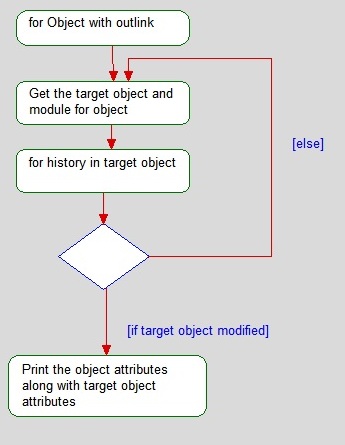
But when I tried to commnet only the handling of modules based on the links(line 118-128), it was working absolutely fine. The logic what I used is that from the current object, if there is any outlink - catch hold of the link, navigate to the target module, check if the object is modified in the target object. If the target object is modified, then flag the current object. Eventhough I provide a different name for the target Module, it is not able to handle.

I have added the flowchart of the operations that are performed in lines 118-128.
Attachments

attachment_14829044_Untitled.jpg

Re: Performing analysis across modules
Mathias Mamsch - Wed May 30 03:32:36 EDT 2012

Lion29 - Tue May 29 03:04:01 EDT 2012
The error was in Line 38, it is the "for loop" - to run the loop in all the objects in the module m.

But when I tried to commnet only the handling of modules based on the links(line 118-128), it was working absolutely fine. The logic what I used is that from the current object, if there is any outlink - catch hold of the link, navigate to the target module, check if the object is modified in the target object. If the target object is modified, then flag the current object. Eventhough I provide a different name for the target Module, it is not able to handle.

I have added the flowchart of the operations that are performed in lines 118-128.

Probably your link code made a change to the current module. This line however (i wonder that this works)
 

m  = load(baseline((major b), (minor b), (suffix b)), true)


seems to try loading a baseline from the current module. However if your link code changes the current module to a module where the baseline does not exist you get a "null module do loop" error since the module handle will be 'null'.

You should always use 'ModuleVersion's:


...
Module modCurrent = current 
for b in modCurrent do {
...
ModuleVersion mv = moduleVersion (module modCurrent, baseline(major b, minor b, suffix b) )
m  = load(mv, true)
delete mv
...


This might resolve the problem. Regards, Mathias


Mathias Mamsch, IT-QBase GmbH, Consultant for Requirement Engineering and D00RS